(Admin UI)
Ory Kratos UI: the admin dashboard you get, the login screens you build
Nautilus runs Ory Kratos for you and puts a dashboard on top of it. You can search your users, end their sessions, delete an account, switch social sign-in and two-factor on, set rules that delete unused accounts, and read an audit log of who did what.
What it does not give you is the screens your customers see: sign-in, sign-up, password recovery. Those are yours to build, against the same flow objects Kratos uses. A library of ready-made screens is on our roadmap. It is not built, and we are not putting a date on it.
One thing to know before you read further: the dashboard works with the Kratos we run. It is not a tool you can point at a Kratos on your own servers.
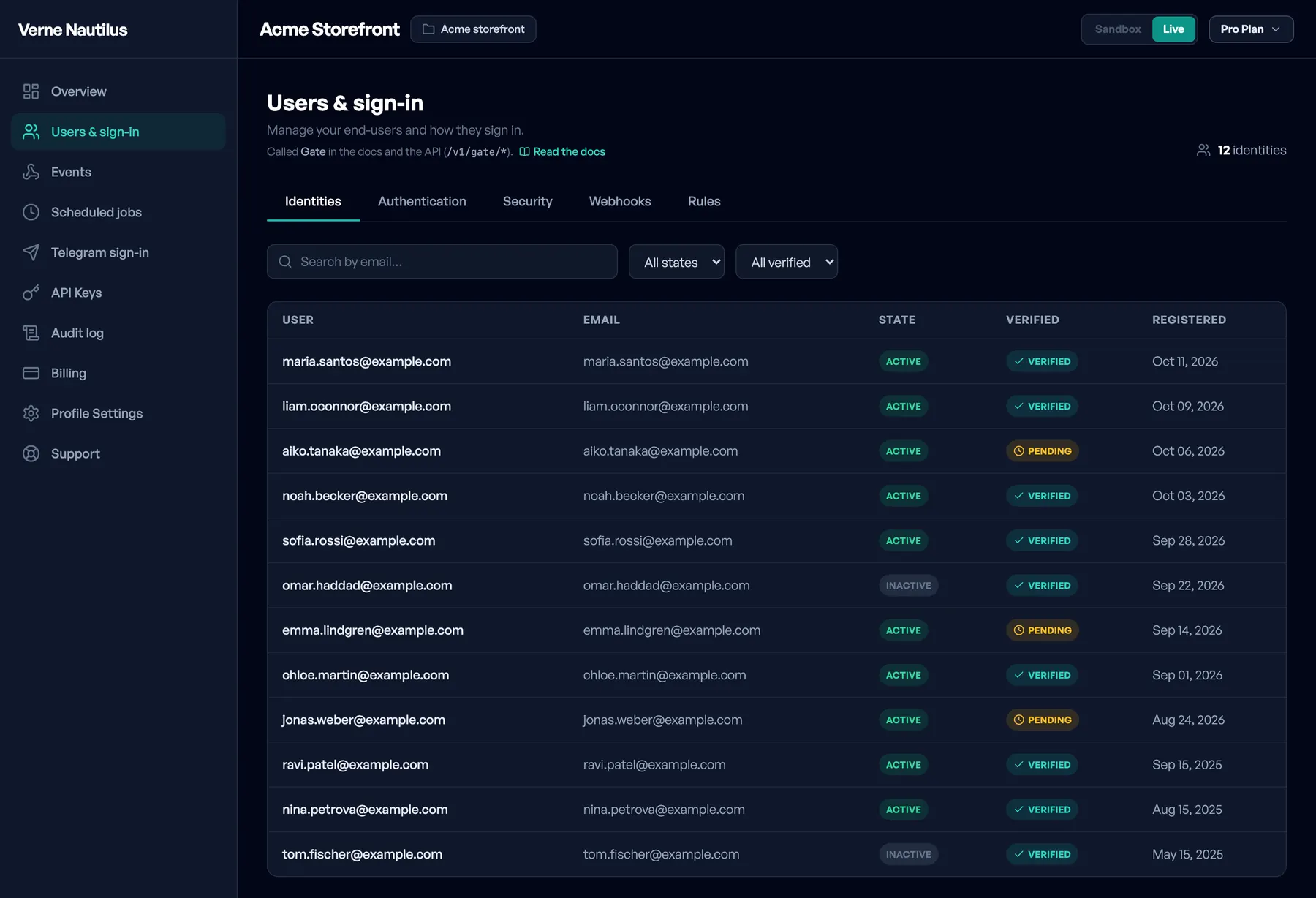
What the dashboard gives you
Open Sign-in and users in the dashboard. It has five tabs, and the audit log and API keys have pages of their own.
Identities
Every end user of the project in one table: name or email address, whether the account is active or inactive, whether the address is confirmed, and the registration date. Search by email; filter by state and by confirmation.
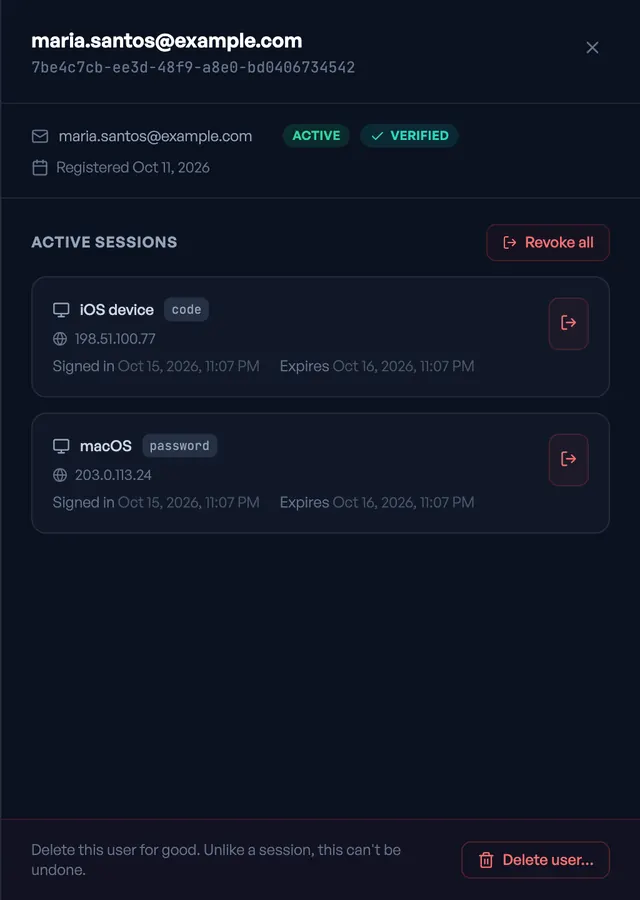
Click a row and a panel opens with that person’s sessions: the device, the address it came from, how they signed in, when the session started and when it expires. You can end one session or all of them, which is the button behind a "sign me out everywhere" request.
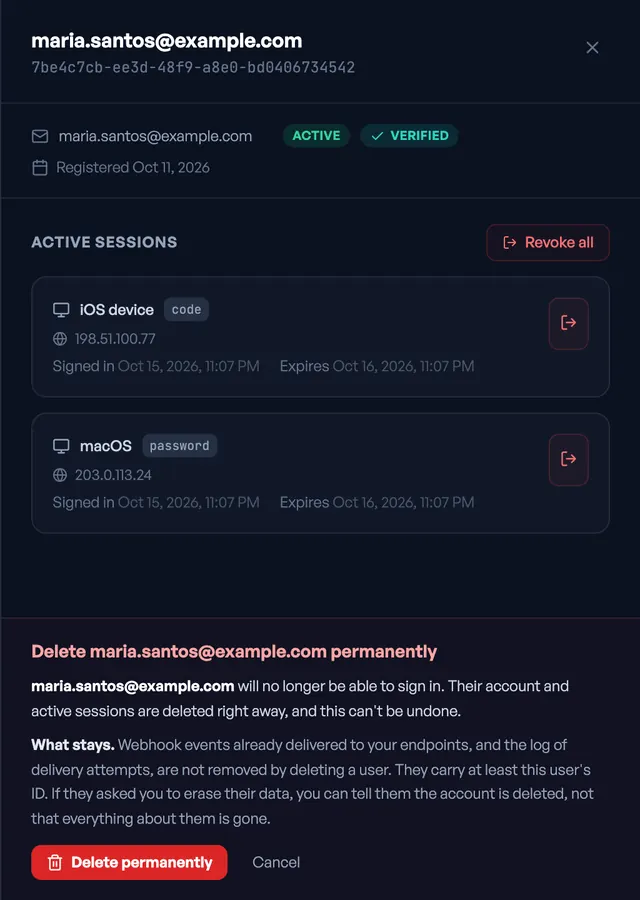
At the bottom of the panel, set apart in red, is Delete user. It asks first, and it says what stays behind: webhook events already delivered to your endpoints, and the delivery log, are not removed, and they carry at least the user’s ID. If someone asked you to erase their data, the screen is clear that you can tell them the account is deleted, not that everything about them is gone.
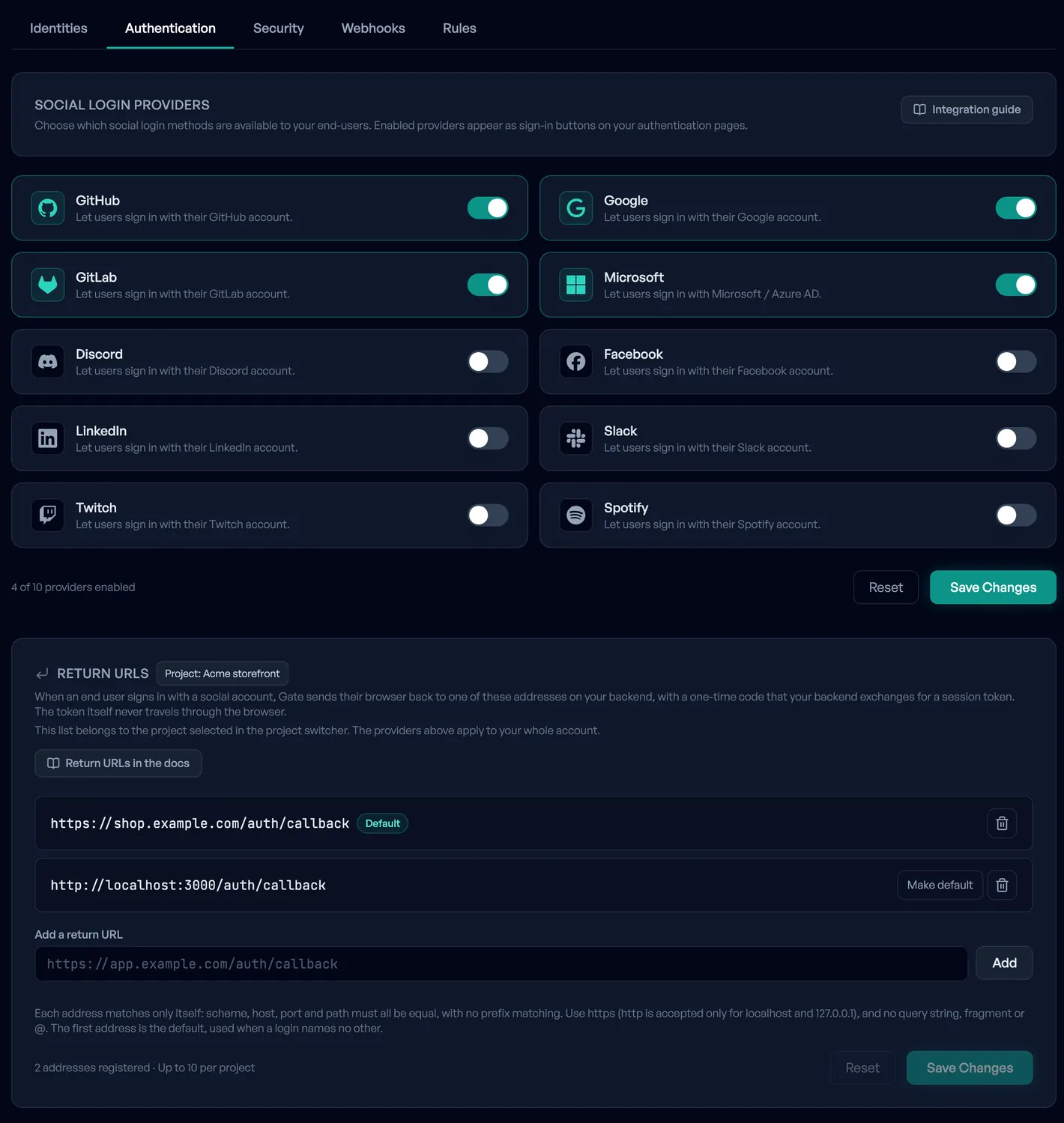
Authentication
Ten social sign-in providers, each a switch: GitHub, Google, GitLab, Microsoft, Discord, Facebook, LinkedIn, Slack, Twitch and Spotify. Under them, the return URLs for each project: the addresses on your backend where a person’s browser lands after signing in with a social account. Each one matches exactly (scheme, host, port and path), https only except for localhost.
Security
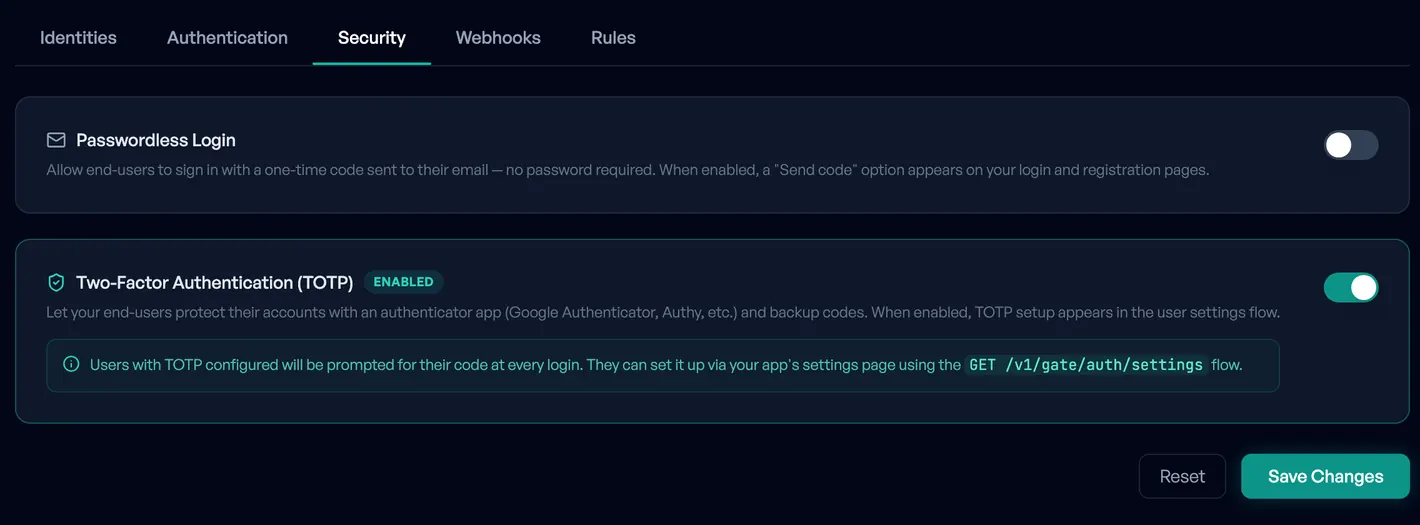
Two switches. One turns on sign-in with a six-digit code sent by email, so no password is needed. The other turns on two-factor sign-in with an authenticator app and backup codes. Turning two-factor off does not remove anyone’s authenticator; the dashboard tells you how many of your users have one set up before you confirm.
Webhooks
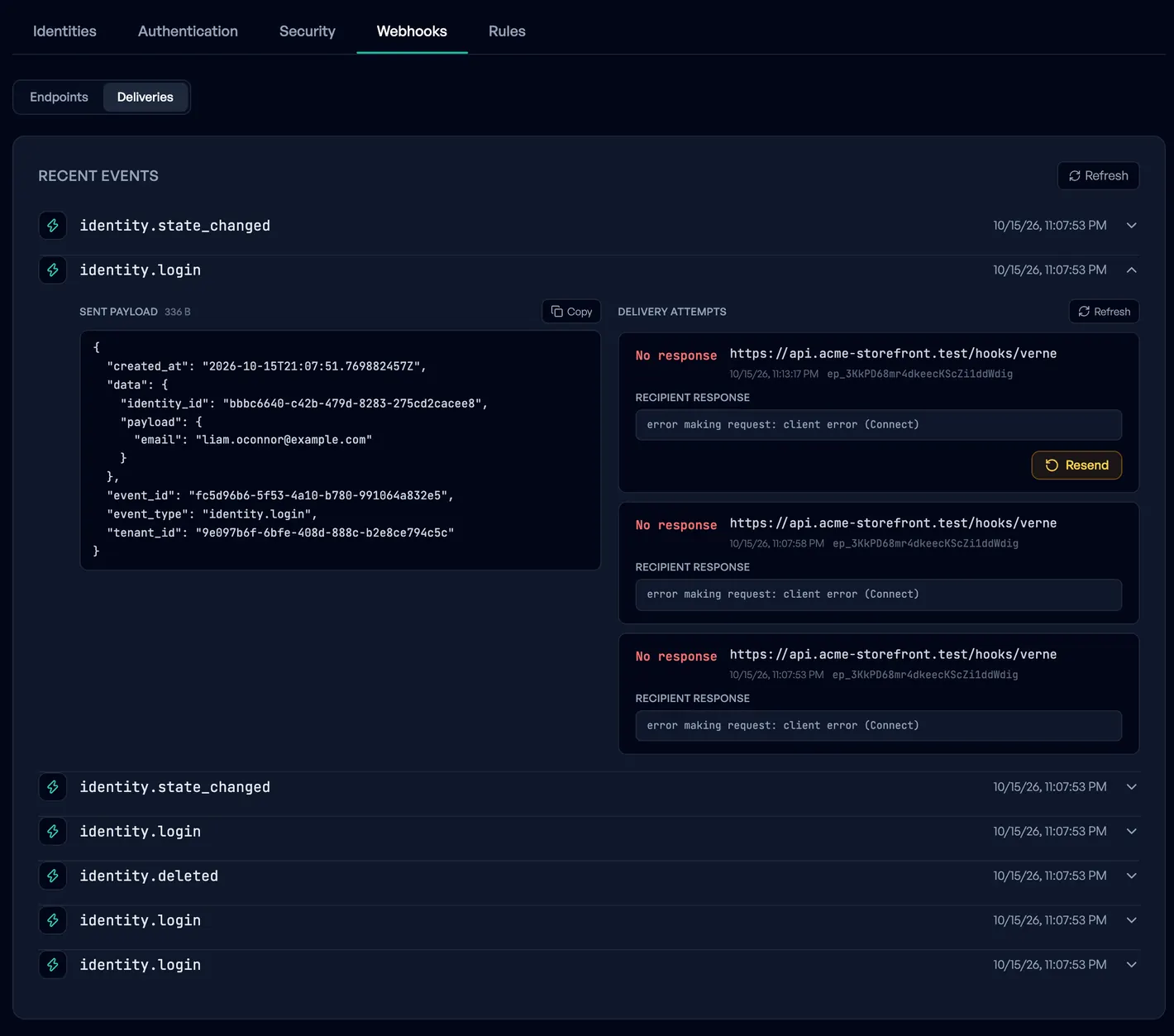
Endpoints for six identity events (created, deleted, login, password changed, email verified, state changed). Each delivery is signed and retried. The second view lists the events as they were sent, and lets you resend one or replay everything that failed for an endpoint.
Rules
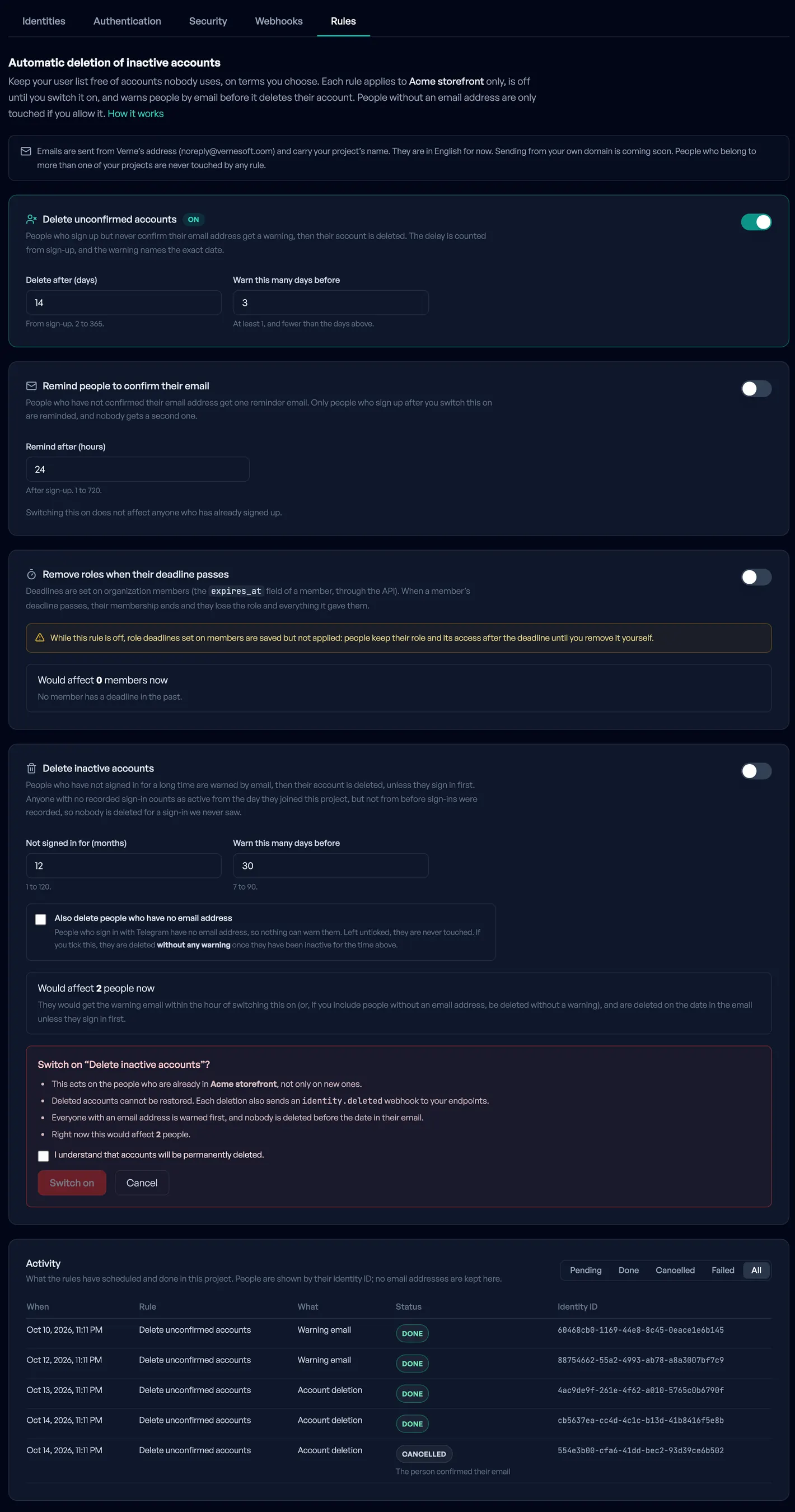
Four rules that clean up accounts, each off until you switch it on. Before a rule that deletes, the tab shows how many people it would touch right now, and asks you to confirm. People get a warning email before anything is deleted. Under the rules is the list of what was scheduled and done, including the reason when something was cancelled. The Free plan has one of the four rules (unconfirmed accounts); the other three are on Pro and above. More on the GDPR deletion page.
Audit log and API keys
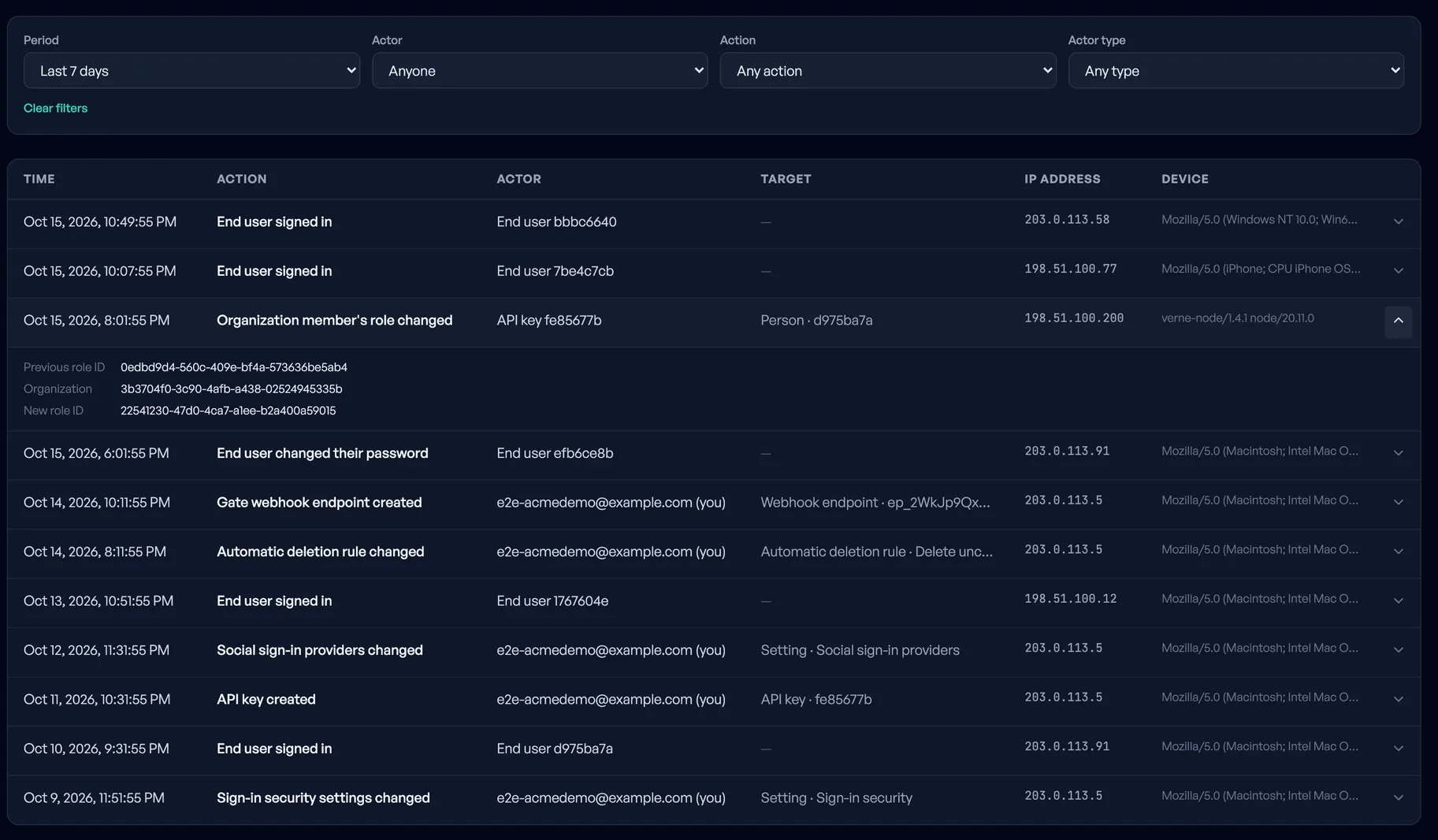
The audit log is its own page. Entries run newest first, and you can filter by period, by who did it, by action and by type of actor. It records changes to keys, project members and settings, changes to roles, and your end users’ sign-ins and password changes, each with address and device. Nothing edits it or deletes an entry early. It is kept 7 days on Free, 30 on Pro and 90 on Advanced. Failed sign-ins and Telegram sign-ins are not in it.
API keys are created and revoked on the Keys page, each with the scopes you choose.
What the dashboard does not do
If you are comparing it with a general Kratos admin screen, these are the gaps:
- It does not create or edit a user. Creating, changing traits and metadata, and activating or deactivating an account are done through the API.
- It does not manage organizations, roles or members. Those are API only; there is no members screen yet.
- It does not show credentials, and it does not edit the identity schema or Kratos’ configuration. The schema is fixed (email, locale, and a free-form metadata field).
- It shows only your own end users. Nautilus does not hand out the rest of Kratos’ admin API.
- Exporting all your users with their password hashes is a request to a person, not a button. See "If you stop using Nautilus", below.
Login and sign-up screens: not included today
Nautilus has no hosted sign-in page and no drop-in components. Your customers sign in on screens you build, in your app, in your style.
That is how Kratos works anyway. It hands your application a flow object and your application draws the form. Ory’s own documentation puts the interface on your side of the line, and Nautilus keeps the same shape: a sign-in, a registration, a recovery, an address verification and a settings flow (that is where the authenticator-app step lives) all come back as a flow with a ui object. In it is an action address to post to and a list of nodes, the fields, buttons and messages to show, with Kratos’ own message ids for errors (4000006 is wrong credentials, 4000007 an address that is taken). Render the nodes and your form follows the server when it changes.
The short version is the guides. They are for two stacks, and each says every line was run:
- Add sign-in to a Next.js app with Nautilus: sign-up, sign-in, a protected page and sign-out, with the Node SDK and server actions. The form is one small component.
- Add sign-in to a Laravel app with Nautilus: the same, with the PHP SDK, a middleware that checks the session, and views.
Official SDKs exist for Node, Python, PHP and Rust. Elsewhere you call the HTTP API; the API reference lists the flow routes.
On our roadmap: ready-made screens
We plan a frontend library with the screens ready to use: sign-in, sign-up, password recovery, address verification, profile settings with the second factor, and social sign-in. It would sit on the same flows described above. The default styling would be ours; the colours, fonts, logo and wording, and the replacement of any component, would be yours.
It is planned, not built. We are not giving a date and we will not make one up. What decides its place on the list is people asking for it, so if you would use it, write to support@vernesoft.com and say which framework you build in. We have not settled that yet.
What Nautilus adds to a bare Kratos
The sign-in in Nautilus is Ory Kratos, the open-source identity server (Apache 2.0), unmodified. The rest is what you would otherwise build or run beside it.
| Area | What Nautilus adds |
|---|---|
| Admin screen | The dashboard above. Open-source Kratos comes with an Admin API and a command-line tool; the web console is part of Ory Network. |
| Separate customers | Every end user and every key is bound to one tenant, and a key acts only on its own tenant’s users. The same email address can be an end user of two tenants; they are two different people. |
| API keys | Keys with scopes, per project, revocable from the dashboard. |
| Audit log | Who did what in the account, and your users’ sign-ins and password changes. 7, 30 or 90 days by plan. |
| Deletion of unused accounts | Four rules, each off until you switch it on, with a warning email before any deletion. Docs |
| Organizations and roles | Groups of your users, named roles with permissions, and a permission check as one API call. On every plan. API only. Docs |
| Signed tokens | A JWT (ES256, valid 15 minutes) for a signed-in user, verifiable offline against your tenant’s public keys, with their organizations and roles. It cannot be revoked. Docs |
| Identity webhooks | Six events, signed and retried. |
| Counting | Active users per calendar month (UTC) against your plan’s limit. Past the limit sign-in is never blocked. |
What we run, and where
- Version. Ory Kratos v26.2.0. The image is pinned to that tag; we do not follow
latest. - Upgrades. Moving the pin is a change in our repository like any other. Before a release is deployed, the pipeline starts a real Kratos next to our API and gateway and runs a set of tests against it, to catch the case where Kratos answers differently from what our code expects: the shape of a session, an identity schema that rejects a payload a test double accepted. A red run stops the deploy.
- Where. On our own servers at OVHcloud in France, one region, no choice of another. Verne Software, the company, is registered in Serbia.
- Support and availability. There is no on-call rota and no round-the-clock support, and we say so on the support page: replies within one business day are a target, not a contract. Availability has a 99.9% target, with uptime history on the status page. It is a target; there is no SLA and no service credit behind it.
Limits
What Nautilus does not have, so you can stop reading here if one of these is a requirement:
- No hosted login screens or components (see the roadmap above).
- No passkeys, no SMS codes, no Sign in with Apple.
- No SAML, no SCIM, no enterprise single sign-on.
- Not an OAuth 2.0 or OpenID Connect provider for other applications: no Ory Hydra. The signed tokens are for your own users and your own backend.
- A fixed user schema. Nautilus exposes Kratos’ API flows, not its browser flows.
- One region, France. No SOC 2 or ISO 27001 report.
- Organizations and roles have no dashboard screen.
If you need your own identity schema, passkeys or SAML, running Kratos yourself, or Ory Network, is the better choice. We wrote down when each fits in Self-hosted Ory Kratos or Nautilus.
If you stop using Nautilus
The engine is open-source Kratos, so the format of your user data is one you can read. For the users themselves, write to support@vernesoft.com from your account address, with a public key made with age. Within 7 days of your request being confirmed you get one file, encrypted to that key: every user with the bcrypt password hash, social links, metadata, organizations and roles. Second-factor secrets are not in it, so people set up their second factor again. A person on our side runs it; there is no button and no API call. The export page shows how to load the file into Kratos’ admin API.
The dashboard, the rules, the audit log and the signed-token service are ours and stay here.
Price, next to Ory Network
Nautilus: Free is €0 for 1,000 active users a month, Pro is €99 (≈ $110.83) for 10,000, Advanced is €199 (≈ $222.78) for 50,000. Organizations, roles and the dashboard are in every plan.
Ory Network, from its pricing page, checked 15 Oct 2026: a free Developer plan meant as a proof of concept, Production at $770 a year plus $0.14 per average daily active user a month, and Growth at $9,350 a year plus $0.12 per average daily active user, which is where organizations start. Ory counts daily users and we count monthly ones, so there is no honest row to put side by side. Where Ory is plainly ahead: passkeys, a hosted account page, your own project and schema, a choice of regions, SAML and SCIM on Enterprise.
The full comparison, with the cases where Ory costs less, is on Ory Network alternative.
Questions
- Is there an admin UI for Ory Kratos?
- Open-source Kratos comes with an Admin API and a command-line tool; the web console is listed under Ory Network on the project’s page. The Nautilus dashboard is a web admin UI for the Kratos we run for you. It does not attach to a Kratos on your own servers.
- Does Nautilus have login and registration pages for my users?
- No. You build the screens in your app against the sign-in, registration, recovery, verification and settings flows, and the guides for Next.js and Laravel show how. A library of ready-made screens is on our roadmap, with no date.
- When will the ready-made screens be ready?
- We do not give a date. They are planned and not started. Writing to support with the framework you use is the thing that moves them up.
- Can I edit a user in the dashboard?
- Not today. The dashboard lists users, shows their sessions, ends sessions and deletes an account. Creating a user, changing their metadata and deactivating an account go through the API.
Try it yourself
The Free plan has the dashboard, 1,000 active users a month and no card.